Discord Gifts
This page explains step by step how to configure, use, and customize the Discord Gifts addon for ClientXCMS. Objective: automate "Discord gifts" (random credits) sent to your users via a unique code, all driven by Webhook.
1. General Principle
-
Scheduling
- You define a time slot (activation duration & delay before the next gift).
- A unique code (e.g.,
CC-PZCRYGZ3) is generated and shared on your Discord server.
-
Distribution
- Each user can use the code only once from the client area (or API).
- The credited amount is random between a minimum and maximum that you set.
-
Notification
-
The addon automatically sends one or more Webhook messages:
- Start: gift announcement.
- Usage: when a member uses the code.
- End: when there are no more possible uses or upon expiration.
-
-
Tracking
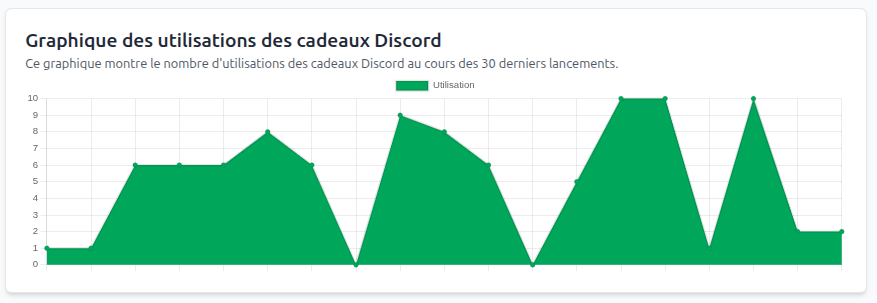
- A graph in the admin panel tracks uses over the last 30 launches.
2. Prerequisites
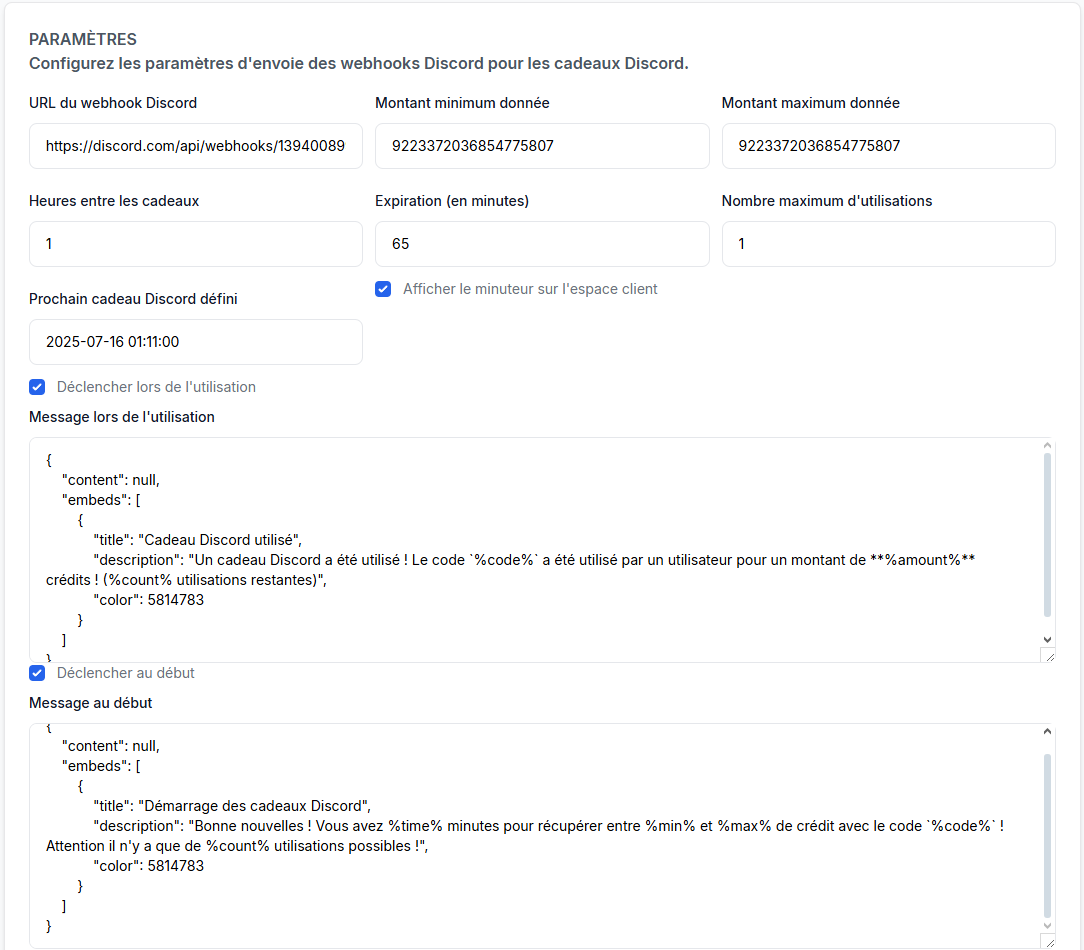
Once the extension is activated, you can access the addon configuration in Admin Panel > Settings > "Customization" Section > "Discord Gifts"
| Element | Version / Detail |
|---|---|
| Dependencies | Gift Cards |
| Add-on | Discord Gift |
| Discord | "Manage Webhooks" permissions on the target channel |
| User Role | Must have authorization to use gift codes (default setting) |
3. Creating the Discord Webhook
- Open the Discord channel where you want to publish the announcement.
- Edit Channel → Integrations → Webhooks → New Webhook.
- Copy the provided URL (
https://discord.com/api/webhooks/{id}/{token}). - Paste it in the Discord Webhook URL field (see § 4).
4. Main Settings
| Field Name | Function | Example |
|---|---|---|
| Discord Webhook URL | URL copied in the previous step | https://discord.com/api/webhooks/13940089/… |
| Minimum amount given | Lowest credit (in cents) | 1000 → €10 |
| Maximum amount given | Highest credit (in cents) | 5000 → €50 |
| Hours between gifts | Interval before the next automatic launch | 1 = 1 hr |
| Expiration (in minutes) | Duration during which the code remains valid | 65 |
| Maximum number of uses | Number of people who can use the code | 1 or ∞ |
| Show timer on client area | Countdown bar visible to customers | ✅ / ❌ |
| Next Discord gift defined | UTC date/time of next launch (editable) | 2025-07-16 01:11:00 |
ℹ️ Amounts are stored in cents to avoid decimals (ClientXCMS convention).
5. Webhook Messages
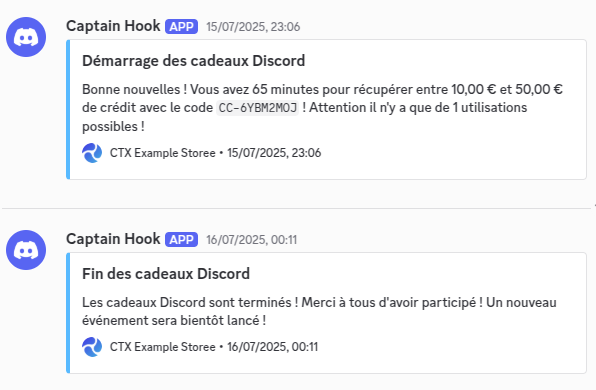
Each event can trigger a customized JSON:
5.1 Available Placeholders
| Placeholder | Replaced by… |
|---|---|
%code% | Current gift code |
%amount% | Credited amount (formatted) |
%min% / %max% | Min / Max values |
%time% | Time before expiration (minutes) |
%count% | Remaining uses |
5.2 Example: Start Message
{
  "content": null,
  "embeds": [
    {
      "title": "Discord Gifts Starting",
      "description": "Good news! You have %time% minutes to claim between %min%€ and %max%€ in credit with code `%code%`! Attention, there are only %count% possible uses!",
      "color": 5814783
    }
  ]
}
5.3 Example: Usage Message
{
  "content": null,
  "embeds": [
    {
      "title": "Discord Gift Used",
      "description": "A Discord gift has been used! Code `%code%` was used by a user for **%amount%€** credits! (%count% uses remaining)",
      "color": 5814783
    }
  ]
}
5.4 Example: End Message
{
  "content": null,
  "embeds": [
    {
      "title": "Discord Gifts Ended",
      "description": "Discord gifts are over! Thank you all for participating! A new event will be launched soon!",
      "color": 5814783
    }
  ]
}
You can uncheck "Trigger at start / at end / on usage" according to your needs.
6. Dashboard & Graph
-
Usage Graph Displays the number of uses (green dots) for each of the last 30 launches. Useful for tracking engagement and adjusting gift value or frequency.
-
Settings Section All fields are reactive; clicking Save immediately applies the new values and updates the scheduling.
7. Best Practices
- Limit amounts: set a reasonable max to avoid accidentally high credits.
- Dedicated Webhook: create a Webhook specific to the addon to avoid mixing with other integrations.
- Test on a private channel: before the first public launch, verify your messages in a staff-only channel.
- Multiple uses: if you set
Maximum number of uses > 1, clearly inform the community to avoid misunderstandings. - Logs: coupled with the billing module, each use is logged for complete auditing. |