Support ID
The Support ID addon for CLIENTXCMS introduces a simple, reliable, and universal identification system that associates each customer with a unique support code. This code becomes the central reference for instantly recognizing a user, whether they contact your support via ticket, Discord, email, phone, or any other channel.
The Support ID addon requires CLIENTXCMS version 2.14.9 or higher.
Extension Configuration
You can configure the extension by going to Admin Panel > Settings > Extension Settings > Support ID.
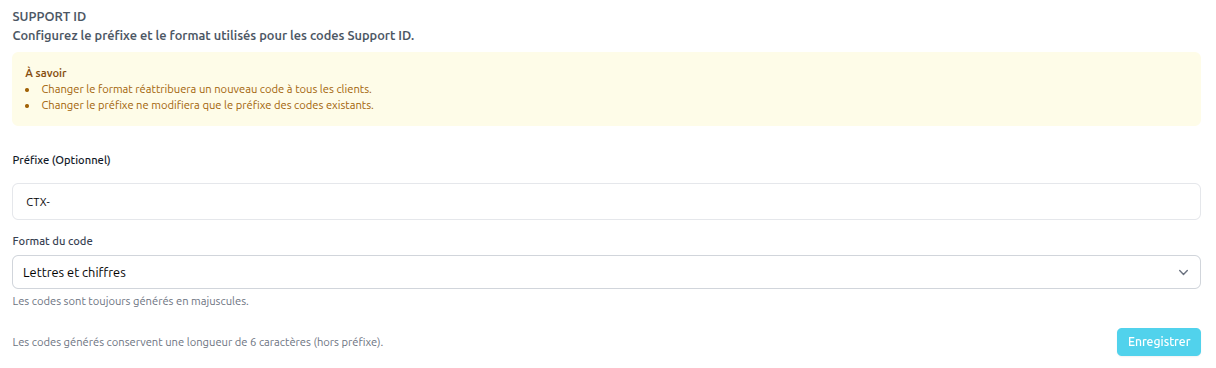
- Support ID Prefix: Defines the prefix used to generate Support IDs (default: CTX-).
- Code Format: Choose between alphanumeric or numeric-only code for the Support ID.
API
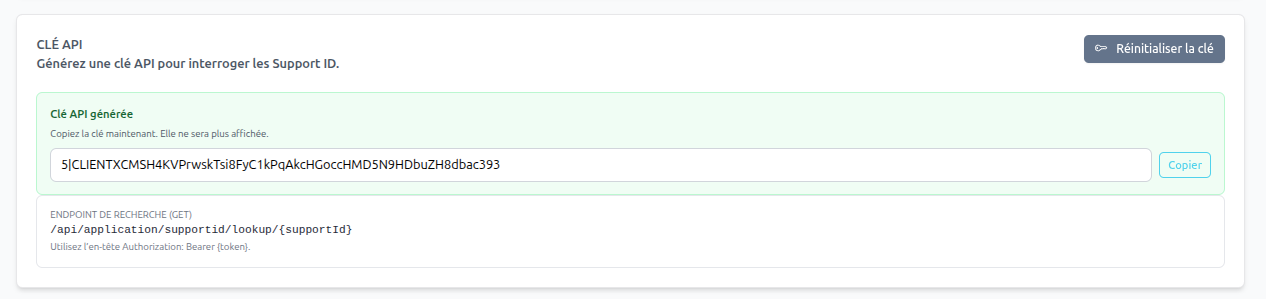 You can access Support ID information via the CLIENTXCMS REST API. Here is the available endpoint:
GET /api/v1/addons/supportid/{client_id}: Retrieves the Support ID for a specific customer using their customer ID.
Request Example
curl -X GET "https://clientxcms.app/api/v1/addons/supportid/CTX-RJ347X" -H "Authorization: Bearer YOUR_API_TOKEN"
Response Example
{
  data: {
    "id": 1,
    "support_id": "CTX-RJ347X",
    "firstname": "XX",
    "lastname": "XX",
    "email": "test@clientxcms.com",
    "company_name": null,
    "billing_details": null,
    "locale": "fr_FR",
    "phone": "XXX",
    "address": "XX",
    "address2": null,
    "city": "XX",
    "country": "FR",
    "region": "XXX",
    "zipcode": "XXX",
    "email_verified_at": "2025-10-25T15:52:03.000000Z",
    "balance": "15.00",
    "last_login": null,
    "is_confirmed": 1,
    "confirmation_token": null,
    "is_deleted": 0,
    "deleted_at": null,
    "totp_secret": null,
    "dark_mode": 1,
    "notes": null,
    "created_at": "2025-09-07T16:33:58.000000Z",
    "gdpr_compliment": 0
  }
}
You can reset the API key by clicking the "Reset Key" button in the extension configuration section.
Site Display

Theme Support
To display the Support ID on your theme, add this code in the /views/front/client/index.blade.php file:
@includeWhen(app('extension')->extensionIsEnabled('supportid'), 'supportid::card')