Pennylane
Pennylane can import ClientXCMS Factur-X invoices and handle their legal transmission through its approved platform. The addon can also synchronize paid invoices for accounting purposes.
Enable the Pennylane addon. The Company API requires an eligible Pennylane plan and an administrator or executive role on the company workspace.
Create a Company API token
- Sign in to the relevant company workspace in Pennylane.
- Go to Settings > Connectivity > Developers.
- Click Generate an API Token.
- Name it
ClientXCMS. - Under API V2, grant the read and write permissions required to import Factur-X invoices.
- Choose an expiration date and generate the token.
- Copy it immediately: Pennylane only displays it once.
For testing, create a Pennylane test environment from your account, open that sandbox workspace, and generate a separate token from Company settings > Connectivity > Developers.
A token belongs to one company and one environment. Never use the production token in the sandbox or publish it in a screenshot. Revoke and replace any exposed token.
Configure Pennylane
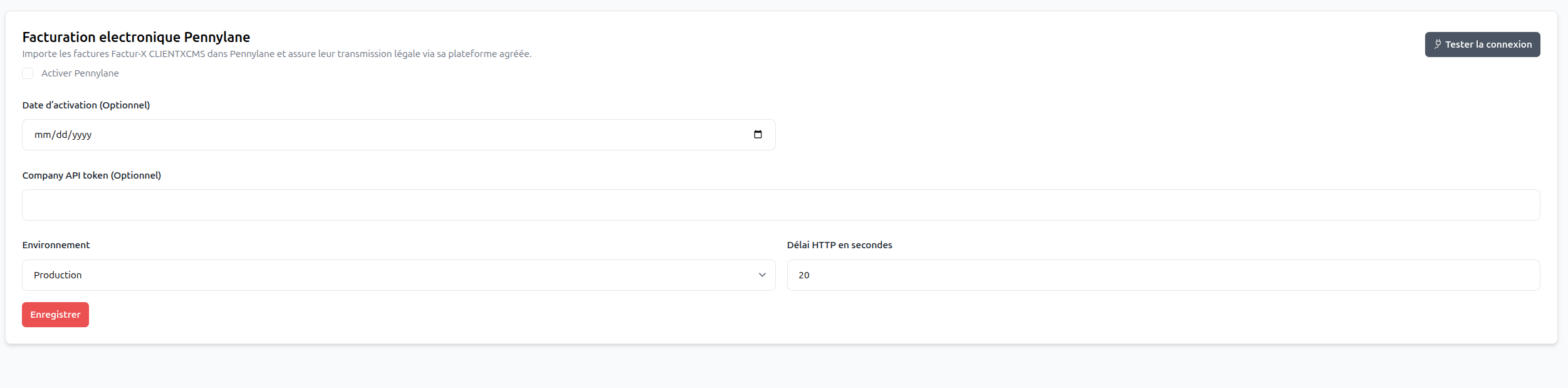
Go to Settings > Billing > Pennylane electronic invoicing and complete:
- Activation date: optional date from which transmissions begin;
- Company API token: the token generated in the matching Pennylane workspace;
- Environment: production or sandbox;
- HTTP timeout: maximum time allowed for an API request.
Enable Pennylane, save, then click Test connection.
Select Pennylane as the active provider
Go to Settings > Billing > Billing > Factur-X and e-reporting:
- Complete the seller tax identity.
- Enable electronic invoicing for new documents when ready.
- Select
PENNYLANEas the Active provider. - Select
LOCALorCHORUS-PROas the Public-sector provider. - Configure the VAT regime, tax timezone, and optional activation date.
- Save the settings.

The LOCAL provider generates and stores the documents in ClientXCMS without sending them to Pennylane.
Existing accounting import
To process previously paid invoices for the historical accounting integration, run:
php artisan pennylane:process-invoices --start-date=YYYY-MM-DD --end-date=YYYY-MM-DD
Only paid invoices in the selected period are processed. Unpaid or cancelled invoices and manual payments made with customer credit are not imported.