Chorus Pro
The Chorus Pro addon sends invoices intended for French public-sector entities through the PISTE API. It is the public-sector provider used alongside the main Factur-X and e-reporting provider.
Enable the Chorus Pro addon before configuring the connector.
Obtain the PISTE credentials
Chorus Pro uses OAuth 2.0 through PISTE and a Chorus Pro technical account.
- Create or sign in to your account on the PISTE portal.
- Create an application and subscribe it to the Chorus Pro API, first in the sandbox if you want to test the integration.
- In the application, generate an API key and copy the Client ID and Client Secret.
- In Chorus Pro, declare a PISTE API connection for the relevant structure and application.
- Create a Chorus Pro technical account attached to that structure. Keep its login and password available in the format requested by ClientXCMS.
Production and qualification are separate environments. Create and approve the appropriate PISTE application and Chorus Pro connection for each environment.
Store the client secret and technical-account credentials securely. Never include them in screenshots, support messages, or version control.
Configure Chorus Pro
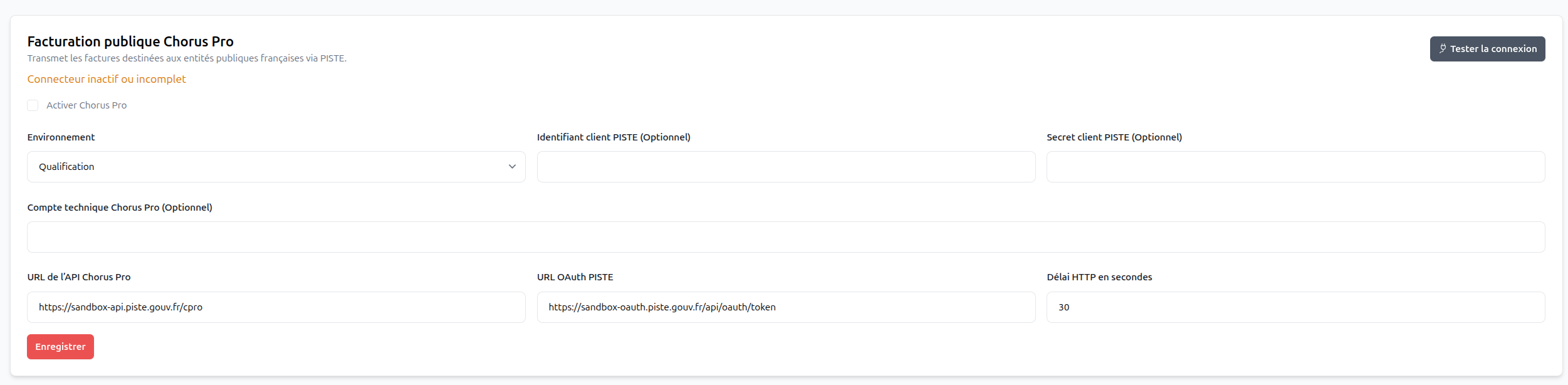
Go to Settings > Billing > Chorus Pro electronic invoicing and complete:
- Environment: qualification for tests or production for real invoices;
- PISTE Client ID and PISTE Client Secret;
- Chorus Pro technical account;
- Chorus Pro API URL and PISTE OAuth URL: keep the values matching the selected environment;
- HTTP timeout: maximum time allowed for an API request.
Enable Chorus Pro, save, then click Test connection.
Select the public-sector provider
Go to Settings > Billing > Billing > Factur-X and e-reporting:
- Enable electronic invoicing for new documents when you are ready.
- Select the main Active provider separately:
LOCAL,QONTO, orPENNYLANE. - Under Public-sector provider, select
CHORUS-PRO. SelectLOCALif ClientXCMS must not transmit public-sector invoices through Chorus Pro. - Save the billing settings.

Validate the complete workflow in qualification before enabling production: authentication, recipient identification, invoice submission, and returned status.