SumUp
The SumUp gateway allows you to accept credit card payments via the SumUp platform.
You can manage payment gateways from:
Settings > Store Settings > SumUp
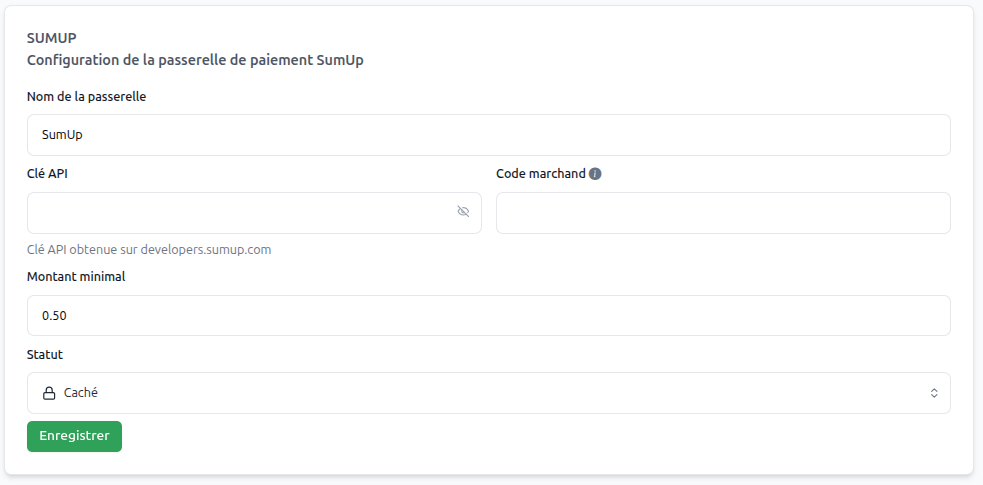
Retrieving Your Keys
To configure SumUp, you need to retrieve your credentials from the SumUp Dashboard:
- Log in to your SumUp Dashboard.
- Go to For Developers or API Keys.
- Create a new Client ID and Client Secret.
Security
Keep your Client Secret confidential. It allows your system to securely communicate with SumUp to process payments.
System Operation
Payment Process
- Payment Method Selection: The customer chooses "SumUp" during checkout.
- Redirect to SumUp: The customer is directed to SumUp's secure payment interface.
- Payment Confirmation: The customer enters their card details and confirms the transaction.
- Automatic Validation: SumUp notifies your system, and the order is automatically validated.
- Return: The customer returns to your store upon completion.
Gateway Configuration
Essential Parameters
Gateway Name | (text)
Use "Credit Card" or "SumUp" for your customers.
Minimum Amount | (amount)
Define the minimum amount required for this gateway.
Client ID | (text)
The public identifier for your SumUp integration.
Client Secret | (text)
The secret key used for authentication.
Status | (dropdown menu)
Set to "Active" to enable the gateway.
Operating Mode | (Test/Live)
- Test Mode: For testing purposes.
- Live Mode: For real transactions. Riverside