PayPal
The PayPal gateway in CLIENTXCMS corresponds to the integration of the world's most popular online payment solution that allows your customers to pay for their orders with their PayPal account or credit card via PayPal's secure interface.
The objective is clear: offer a universally recognized, secure, and fast payment method that inspires trust in your customers. A well-configured PayPal system allows your customers to pay in a few clicks while guaranteeing secure receipt of funds.
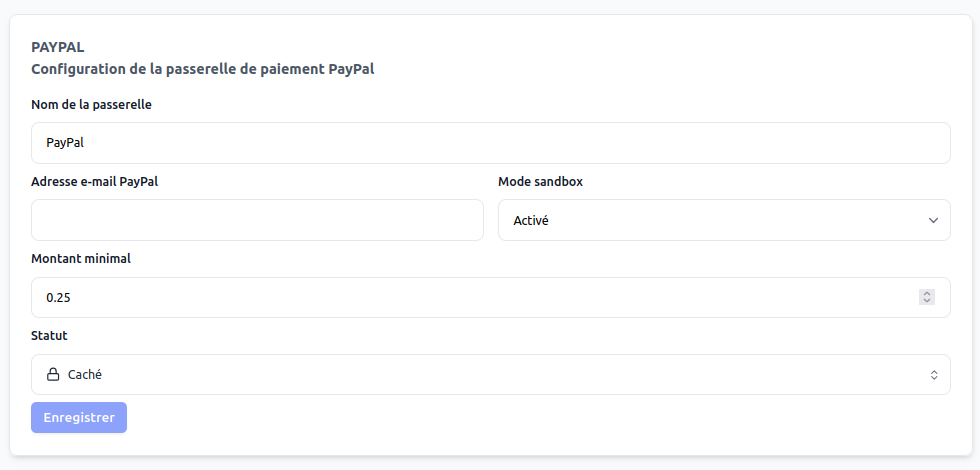
The PayPal gateway can be fully customized: display name, minimum amount, operating mode, IPN configuration, etc.
You can configure the PayPal gateway from:
Settings > Store Settings > PayPal
PayPal is the payment gateway that inspires the most consumer trust. Its presence can significantly increase your conversion rate, particularly internationally.
Why integrate PayPal?
The PayPal gateway is a must-have for global e-commerce. It concretely represents a universal payment method, accepted and recognized by millions of users worldwide.
Integrating PayPal allows you to:
- Reassure your customers with an international trusted brand
- Accept payments from customers without a PayPal account (credit cards)
- Benefit from integrated fraud protection
- Access a wider international market
- Simplify refund and dispute management
- Offer payments in multiple currencies
PayPal is like the universal passport for online payment 🌍 — recognized everywhere, it opens your store to the whole world and instantly reassures your customers.
System Operation
Payment Process
Payment via PayPal follows a secure and smooth process:
- PayPal Selection: The customer chooses "PayPal" as payment method
- Secure Redirect: The customer is directed to PayPal servers
- Authentication: Login to PayPal account or card data entry
- Payment Validation: The customer confirms the transaction on PayPal
- Automatic Return: Redirect to your store
- IPN Notification: PayPal confirms the payment to your system
- Automatic Validation: The order is immediately processed
- Customer Confirmation: Confirmation email and service activation
PayPal Process Advantages
| Advantage | Description |
|---|---|
| Maximum Security | Banking data never transmitted to your site |
| Customer Simplicity | No re-entry for account holders |
| Instant Processing | Automatic payment validation |
| Seller Protection | Coverage against certain types of fraud |
Gateway Configuration
Essential Parameters
Gateway Name | (text)
Simply use "PayPal" for immediate recognition by your customers.
Minimum Amount | (amount)
PayPal imposes no minimum amount. You can configure €0.50 to accept all amounts.
Status | (dropdown menu)
Keep the gateway on "Active" status to maximize conversions.
Operating Mode | (test/live)
- Test mode: For your tests with fictitious transactions
- Live mode: For real transactions with your customers
PayPal Email | (email)
The email address associated with your PayPal merchant account.
For optimal PayPal use:
- Name: "PayPal"
- Minimum Amount: €0
- Status: Active
- Mode: Live (after testing)
Advanced Configuration
The PayPal gateway requires some technical parameters to work perfectly:
- PayPal account email: Your professional PayPal account address
- Return URL: Automatically configured by CLIENTXCMS
- Cancel URL: Redirect in case of payment abandonment
Notification Configuration (IPN)
What is IPN?
IPN (Instant Payment Notification) is a PayPal service that enables secure communication between PayPal and your store to confirm payments in real-time.
Notification URL
CLIENTXCMS automatically generates the notification URL:
https://your-domain.com/gateways/paypal/notification
Configuring IPN in PayPal
To enable PayPal notifications:
- Log in to your professional PayPal account
- Go to "My Account"
- In "Your sales tools", click "More options"
- Select "Instant Payment Notifications"
- Click "Update"
- Enter the URL:
https://your-domain.com/gateways/paypal/notification - Enable notifications
- Save the settings
IPN is essential for the gateway to function properly. Without this configuration, payments may not be automatically validated.
Operating Modes
Test Mode (Sandbox)
Test mode allows you to:
- Test the integration without real money
- Verify IPN proper functioning
- Simulate different payment scenarios
- Train your team on the process
Required account: PayPal developer account with sandbox accounts
Live Mode (Production)
Live mode activates:
- Real payments with real money
- Access to all PayPal tools
- Complete reports and statistics
- PayPal seller protection
Required account: Verified PayPal Business account
Always test in sandbox mode before going to production. Perform several test transactions to validate all scenarios.
Payment Management
Automatic Tracking
With PayPal correctly configured:
- Payments are automatically validated
- Services are activated immediately
- Confirmations are sent automatically
- History is tracked in your interface
PayPal Dashboard
From your PayPal account, you can:
- View all your transactions
- Manage refunds
- Access detailed reports
- Configure advanced settings
Fees and Commissions
PayPal Pricing Structure
PayPal applies commissions on each transaction:
- Domestic transactions: ~2.9% + €0.35
- International transactions: ~3.4% + fixed fees
- Micropayments: Special pricing for small amounts
Cost Optimization
- High volume: Negotiation of preferential rates possible
- Professional account: More advantageous rates than personal account
- Multiple currencies: Avoid automatic exchange fees
- Direct billing: Include fees in your prices or pass them on
Security and Compliance
PayPal Protection
PayPal offers several levels of protection:
- SSL encryption of all data
- Automatic fraud detection
- Seller protection against certain disputes
- Automatic PCI-DSS compliance
Security Best Practices
- Verify IPN: Always validate PayPal notifications
- Monitor transactions: Regularly check your account
- Clear policies: Define your terms of sale
- Team training: Educate your team on best practices
Troubleshooting
Common Problems
| Problem | Solution |
|---|---|
| Unvalidated payments | Check IPN configuration |
| Failed redirects | Check return URLs |
| Restricted accounts | Verify your PayPal account status |
| Unsupported currencies | Enable currencies in your PayPal account |
PayPal Support
In case of technical problems:
- PayPal Help Center: Complete documentation
- Merchant support: Dedicated help for professionals
- Developer community: Specialized technical forums
PayPal is an e-commerce must-have that reassures your customers and simplifies your payments. Careful configuration and regular testing guarantee optimal operation of this essential gateway.