Balance (Store Credit)
The Balance gateway in CLIENTXCMS corresponds to the internal store credit system that allows your customers to use a prepaid balance to pay for their orders. The objective is clear: simplify recurring payments, build customer loyalty, and offer an instant payment experience. A well-configured balance system allows your customers to pay for their purchases in one click while guaranteeing you a secure payment.
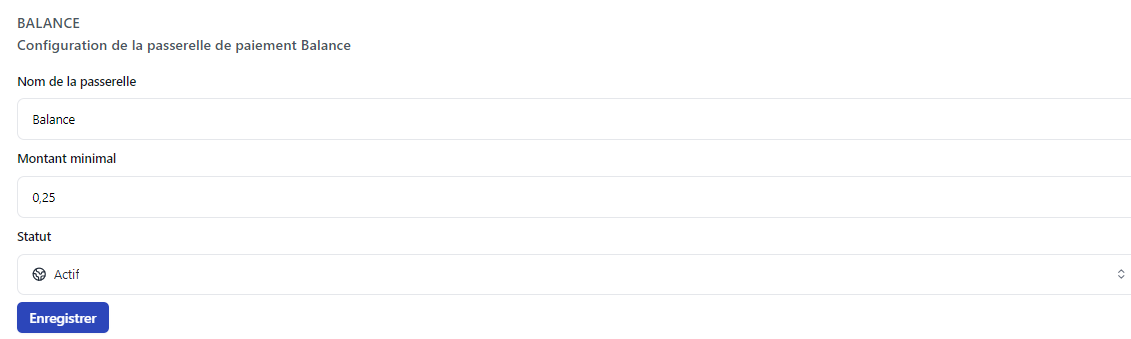
The Balance gateway can be fully customized: display name, minimum amount, usage conditions, etc.
You can configure the Balance gateway from:
Settings > Store Settings > Balance
The store credit system encourages customers to prepay their services, which improves your cash flow and reduces the risk of unpaid bills.
Why use the Balance system?
The Balance gateway is a powerful tool for optimizing your store's payment management. It concretely represents a virtual wallet that your customers can fund and use for their purchases.
Implementing a balance system allows you to:
- Simplify the payment process for regular customers
- Reduce transaction fees on small amounts
- Improve your cash flow with advance payments
- Build customer loyalty with a convenient credit system
- Avoid recurring payment problems
It's like having a dedicated digital wallet for your store 💳 — your customers top up their balance whenever they want and instantly pay for their services.
System Operation
Payment Process
Payment by Balance follows a simplified process:
- Payment Method Selection: The customer chooses "Balance" during checkout
- Balance Verification: The system checks that the balance is sufficient
- Automatic Deduction: The amount is automatically deducted from the balance
- Instant Validation: The order is immediately validated
- Confirmation: The customer receives their payment confirmation
- Delivery: Services are provisioned automatically
Customer Advantages
| Advantage | Description |
|---|---|
| Instant Payment | No waiting for bank validation |
| Maximum Security | No bank data entry for each purchase |
| Budget Control | Clear management of prepaid expenses |
| Ease of Use | One-click payment |
Gateway Configuration
Recommended Parameters
Gateway Name | (text)
We recommend using an explicit name like "Store Credit" or "Account Balance" so your customers immediately understand what it is.
Minimum Amount | (amount)
It is strongly recommended to configure the minimum amount to €0 to allow balance use on all amounts, even the smallest.
Status | (dropdown menu)
Keep the gateway on "Active" status so all your customers can use it.
The ideal configuration for Balance is:
- Name: "Store Credit" or "Account Balance"
- Minimum Amount: €0
- Status: Active
Configuration Interface
This interface allows you to fully customize the display and behavior of the Balance gateway.
Customer Balance Management
Adding Credit to a Customer's Balance
To add credit to a customer's balance:
- Go to the "Customers" menu
- Select the relevant customer
- Modify the "Balance" field on the customer page
- Click "Save" to validate
Funding Methods
Customer balance can be funded in several ways:
| Method | Description |
|---|---|
| Manual Addition | The administrator directly credits the account |
| Add Funds Addon | Customers can top up their balance themselves |
| Gift Cards Addon | Allows customers to use gift cards to credit their balance |
Use the "Add Funds" addon to allow customers to top up their balance independently. This reduces your administrative workload.
Make sure your terms of service clearly mention the rules for using store credit (validity period, refunds, etc.).
The Balance gateway is a major loyalty and optimization tool. It simplifies the customer experience while improving your financial management. Encourage its use!