Binance Pay
The Binance Pay gateway allows you to accept cryptocurrency payments from Binance users.
You can manage payment gateways from:
Settings > Store Settings > Binance Pay
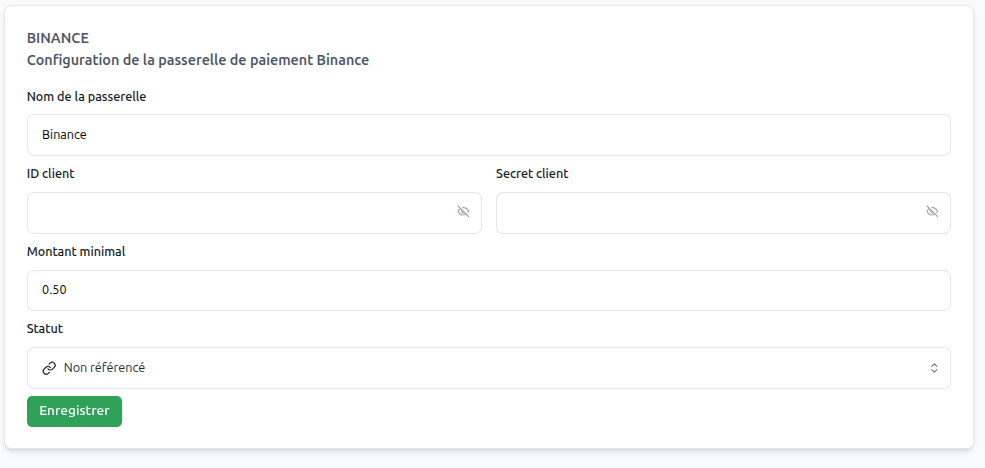
Retrieving Your Keys
To configure Binance Pay, you need to retrieve your credentials from the Binance Merchant Portal:
- Log in to your Binance Merchant account.
- Go to Developers > API Management.
- Create a new API key for your store.
- Securely copy your API Key, Secret Key, and Merchant ID.
The Secret Key is only displayed once when created. Make sure to save it in a secure location.
System Operation
Payment Process
- Payment Method Selection: The customer chooses "Binance Pay" during checkout.
- Redirect to Binance: The customer is directed to Binance's secure payment page.
- Payment Validation: The customer completes the transaction using their Binance account or QR code.
- Notification: Binance sends a notification to your system via webhook.
- Automatic Validation: The order is automatically processed upon confirmation.
Gateway Configuration
Essential Parameters
Gateway Name | (text)
Use "Binance Pay" or "Crypto Payment" for your customers.
Minimum Amount | (amount)
Define the minimum amount required for this payment method.
Merchant ID | (text)
Your unique Binance Merchant identifier.
API Key | (text)
The public API key provided by Binance.
Secret Key | (text)
The secret key used to sign requests and secure transactions.
Status | (dropdown menu)
Set to "Active" to enable the gateway for your customers.