Square
The Square gateway allows you to accept credit card payments via the Square platform.
You can manage payment gateways from:
Settings > Store Settings > Square
Retrieving Your Keys
To configure Square, you need to retrieve your credentials from the Square Developer Portal:
- Log in to the Square Developer Portal.
- Create a new Application or select an existing one.
- In the left menu, go to Credentials.
- Retrieve your Application ID and Access Token.
Ensure you are using the credentials that match your operating mode (Sandbox for testing or Production for real payments).
System Operation
Payment Process
- Payment Method Selection: The customer chooses "Square" during checkout.
- Payment Entry: The customer enters their card details securely.
- Transaction Validation: Square processes the transaction and returns a confirmation.
- Automatic Return: The customer is redirected back to your store.
- Validation: The order is processed immediately upon successful payment.
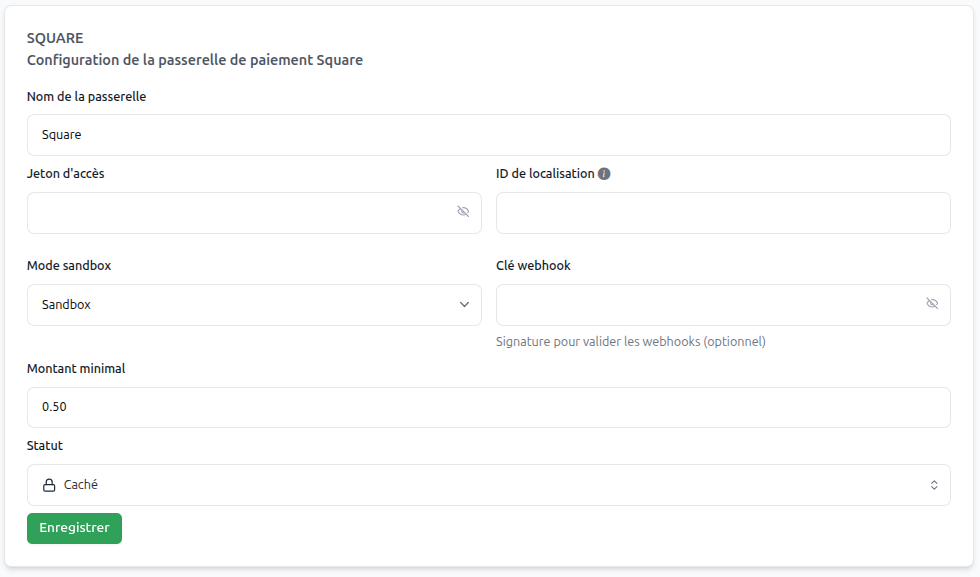
Gateway Configuration
Essential Parameters
Gateway Name | (text)
Use "Credit Card" or "Square" for your customers.
Minimum Amount | (amount)
Define the minimum amount required for this gateway.
Application ID | (text)
The unique identifier for your Square application.
Access Token | (text)
The token used to authenticate API requests to Square.
Status | (dropdown menu)
Set to "Active" to enable the gateway.
Operating Mode | (Sandbox/Live)
- Sandbox: For testing with fictitious transactions.
- Live: For real transactions.