Mollie (Card Payment)
The Mollie payment gateway allows you to accept payments via credit cards.
You can manage payment gateways from:
Settings > Store Settings > Mollie
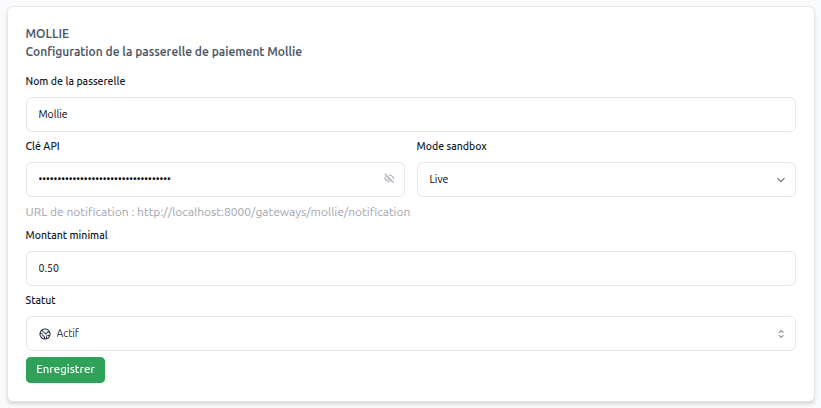
Live Mode vs Test Mode
Mollie's live mode allows you to accept real payments (used in production). Test mode allows you to issue test payments without spending real money (used in development or for testing).
Retrieving Your Keys
- Log in to your Mollie dashboard.
- Go to Developers > API Keys.
- Click Copy to use the API keys.
Then retrieve your live key and test key

System Operation
Payment Process
Payment via Mollie follows a multi-step process:
- Payment Method Selection: The customer chooses "Mollie" during checkout
- Redirect to Mollie: The customer is directed to Mollie payment servers
- Payment Validation: The customer confirms the transaction on Mollie
- Automatic Return: Redirect to your store
- Notification: Mollie confirms the payment to your system
- Automatic Validation: The order is immediately processed
- Customer Confirmation: Confirmation email and service activation
Gateway Configuration
Essential Parameters
Gateway Name | (text)
Simply use "Mollie" for immediate recognition by your customers.
Minimum Amount | (amount)
Mollie imposes no minimum amount. You can configure €0.50 to accept all amounts.
Mollie API Key | (text)
The secret API key that Mollie provides to authenticate transactions.
Status | (dropdown menu)
Keep the gateway on "Active" status to maximize conversions.
Operating Mode | (test/live)
- Test mode: For your tests with fictitious transactions
- Live mode: For real transactions with your customers