Stancer (Card Payments)
The Stancer gateway in CLIENTXCMS corresponds to a modern French card payment solution that allows your customers to securely pay for their orders with their Visa, Mastercard, or other cards.
The objective is clear: offer a high-performing European alternative to American giants with competitive rates and native GDPR compliance. A well-configured Stancer system allows your customers to pay quickly by card while guaranteeing you reduced fees and French customer support.
The Stancer gateway can be fully customized: display name, minimum amount, test/live mode, API keys, etc.
You can configure Stancer from:
Settings > Store Settings > Stancer
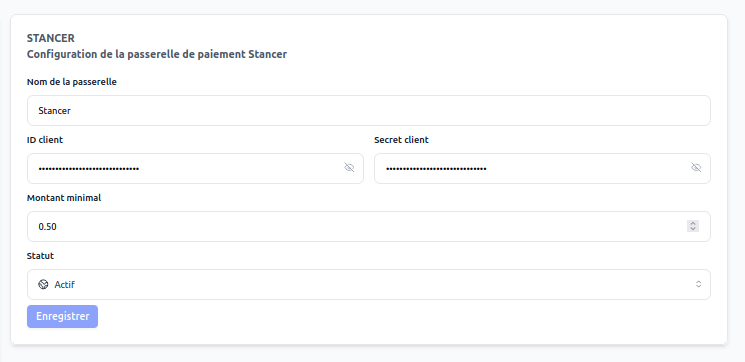
Stancer is a French and European solution that often offers more attractive rates than American solutions, with responsive customer support and exemplary GDPR compliance.
Why choose Stancer?
Stancer represents the new generation of European payment gateways, specifically designed to meet the needs of French and European businesses with a modern and transparent approach.
Adopting Stancer allows you to:
- Benefit from competitive and transparent rates
- Enjoy responsive French customer support
- Natively respect GDPR regulations
- Access cutting-edge technology developed in Europe
- Reduce your transaction costs compared to American giants
- Support the European technology ecosystem
Stancer is like the European champion of card payments 🇫🇷 — international performance with French values and service, ideal for businesses concerned about their data and costs.
System Operation
Optimized Payment Process
Payment via Stancer follows a secure and smooth process:
- Stancer Selection: The customer chooses "Card Payment" (Stancer)
- Secure Redirect: The customer is directed to Stancer interface
- Data Entry: Secure and optimized credit card form
- 3D Secure Validation: Strong authentication according to PSD2 requirements
- Instant Confirmation: Real-time payment validation
- Automatic Return: Immediate redirect to your store
- Webhook Notification: Secure confirmation via Stancer API
- Automatic Processing: Service validation and activation
Stancer Solution Advantages
| Advantage | Description |
|---|---|
| Transparent Rates | No hidden fees, clear pricing |
| French Support | Support team based in France and responsive |
| GDPR Compliance | Native respect of European regulations |
| Modern Technologies | REST API, webhooks, mobile-first interface |
Gateway Configuration
Essential Parameters
Gateway Name | (text)
Use "Card Payment" or "Credit Card" for clear identification by your customers.
Minimum Amount | (amount)
Stancer imposes no minimum. Configure according to your needs (often €1 to avoid micropayments).
Status | (dropdown menu)
Keep on "Active" to offer this European payment alternative.
Operating Mode | (Test/Live)
- Test Mode: Tests with fictitious cards
- Live Mode: Production with real transactions
For Stancer:
- Name: "Card Payment" or "Credit Card"
- Minimum Amount: €1 (or according to your needs)
- Status: Active
- Mode: Live (after testing)
API Key Retrieval
Stancer Dashboard Access
To configure Stancer, you need to retrieve your API keys from your account:
- Log in to your Stancer account
- Go to your management dashboard
- Navigate to the "Developer" section
- View the API keys page
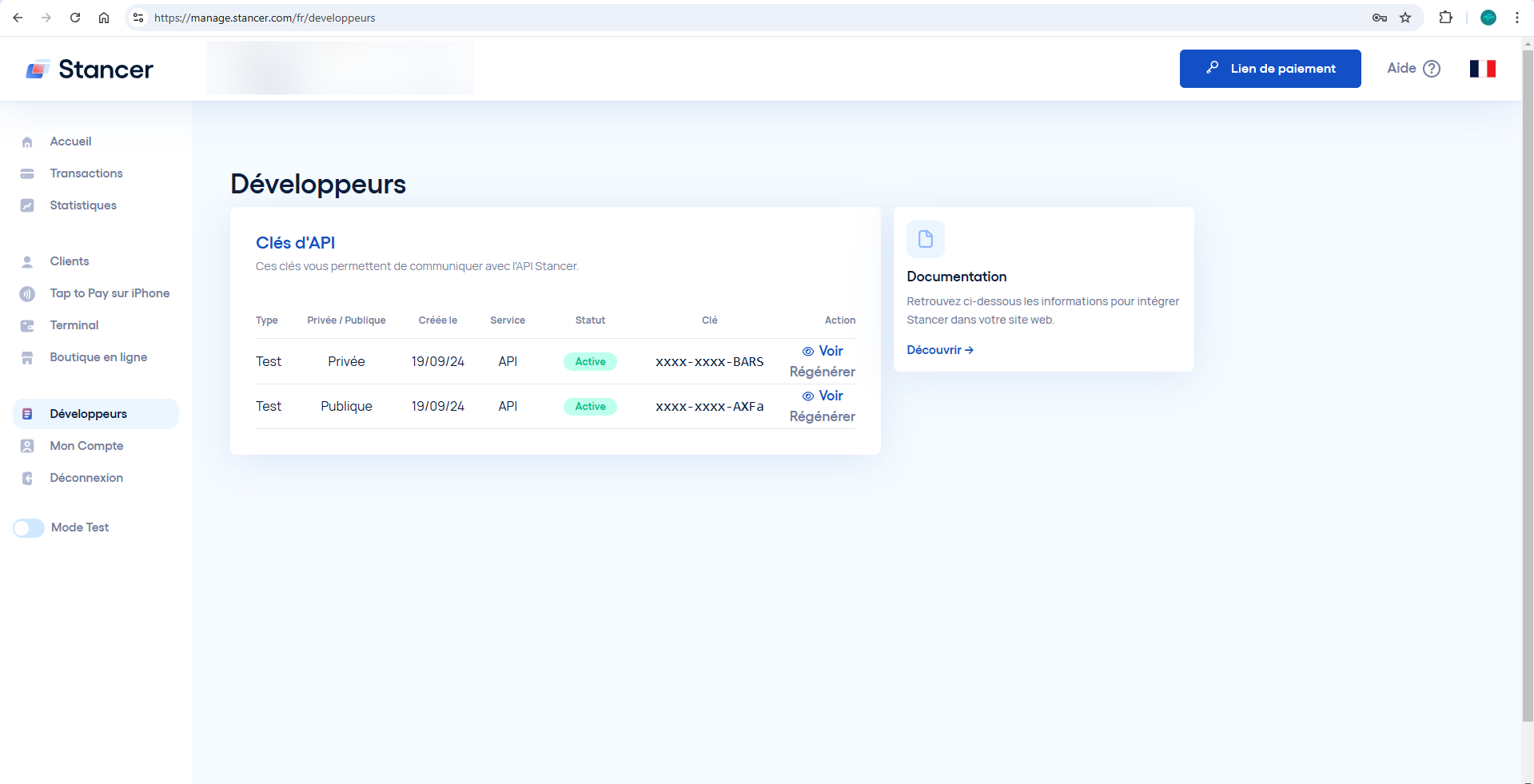
Key Types
Stancer uses two types of keys to secure transactions:
Public Key | (pk_...)
- Used client-side to initiate payments
- Can be publicly exposed without risk
- Necessary for payment form display
Private Key | (sk_...)
- Used server-side for sensitive operations
- Must remain confidential and secure
- Allows payment validation and webhooks
Configuration in CLIENTXCMS
- Copy the public key into the corresponding field
- Copy the private key into the secret field
- Select the mode (Test/Live) appropriate
- Save the configuration
The private key must remain absolutely confidential. Never share it and store it securely. Renew it if you suspect compromise.
Operating Modes
Test Mode
Stancer test mode allows you to:
- Test the integration with test cards
- Validate webhooks and notifications
- Simulate different scenarios (success, failure, fraud)
- Train your team without financial impact
Available Test Cards:
4000000000000002: Valid card for success tests4000000000000069: Card to simulate failures- Other specialized cards according to scenarios
Live Mode
Live mode activates:
- Real payments with real money
- Full access to Stancer management tools
- Detailed reports and analytics
- Dedicated French customer support
Use Stancer test cards to validate all your scenarios before going to production. Test particularly failure cases and refunds.
Technical Advantages
Modern and Performant API
Stancer offers quality technical integration:
| Feature | Advantage |
|---|---|
| Modern REST API | Simple and standard integration |
| Reliable Webhooks | Secure real-time notifications |
| Clear Documentation | Detailed guides and code examples |
| Multiple SDKs | Libraries for all popular languages |
Security and Compliance
Stancer meets all security standards:
- PCI-DSS Level 1 Certification
- PSD2 Compliance and 3D Secure 2.0
- AES-256 Encryption for all data
- Tokenization of credit cards
- Real-time fraud detection
Stancer Pricing
Pricing Structure
Stancer offers simple and transparent pricing:
- European cards: Preferential rates
- International cards: Standard rates
- No hidden fees: Total transparency
- High volume: Negotiable degressive rates
Cost Comparison
| Aspect | Stancer | US Competitors |
|---|---|---|
| Transparency | Total | Variable |
| Support | French | International |
| GDPR Compliance | Native | Adapted |
| European Rates | Optimized | Standard |
Advanced Features
Payment Management
From your Stancer dashboard:
- Real-time tracking of all transactions
- One-click refund management
- Detailed reports and exports
- Fraud detection with scoring
Reconciliation Tools
- Automatic exports to your accounting tools
- Detailed webhooks for system integration
- Reconciliation API for large volumes
- Custom reports according to your needs
Support and Assistance
French Customer Support
Stancer offers:
- Support team based in France
- Optimized response times
- Documentation in French
- Integration support
Available Resources
- Complete online help center
- Detailed technical documentation
- Ready-to-use code examples
- Active developer community
Troubleshooting
Common Problems
| Problem | Solution |
|---|---|
| Invalid keys | Check test/live correspondence |
| Webhooks not received | Check URL and configuration |
| Rejected payments | Check account limits and settings |
| 3D Secure fails | Validate PSD2 configuration |
Diagnosis and Logs
To resolve a problem:
- Check logs CLIENTXCMS
- Check dashboard Stancer
- Test in sandbox mode if necessary
- Contact support Stancer
Stancer represents French excellence in card payments with competitive rates, responsive support, and native GDPR compliance. It's the ideal choice for European businesses concerned about their costs and data.