Service Settings
Service settings are parameters that affect the services in your client area. You can find them by going to Settings > Provisioning > Service Settings.
Services
Days before renewal invoice creation: You can set the number of days before the renewal invoice is created. By default, it is 7 days.
Days before expiration: You can set the number of days before the service expires. By default, it is 7 days. This means the service will remain suspended for 7 days after the expiration date so that the customer can still renew it.
Notification days before expiration: You can set the notification days before service expiration. By default, it is 7, 5, 3, 1 days before the expiration date.
Subscriptions
Days before subscription renewal: This defines the number of days before the expiration date to execute the invoice payment. It must be less than the number of days before renewal invoice creation.
Maximum number of automatic renewal attempts: You can set the maximum number of automatic renewal attempts. By default, it is 7 attempts (days).
Renewal Webhook
Webhook URL: You can set the webhook URL for service renewals or service upgrades (POST, JSON).
If the provided URL is a Discord webhook (e.g., https://discord.com/api/webhooks/xxxxx), notifications will automatically appear as an embed (screenshot below).
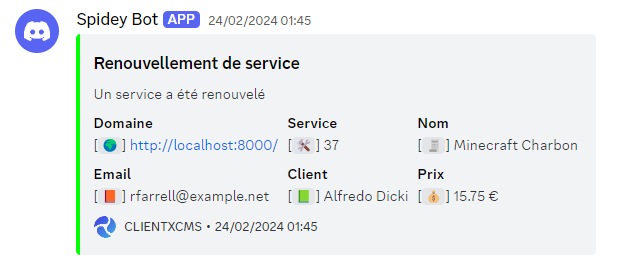
If you use a custom webhook, CLIENTXCMS will send an HTTP POST request with a structured JSON payload. Example
- Service Upgrade
- Service Renewal
{
    "payload": {
		"action": "service_upgraded",
		"customername": "Martin Dev",
		"customeremail": "test@clientxcms.com",
		"customer_url": "https://example.com/admin/customers/1",
		"old_product": "Starter",
		"new_product": "Pro",
		"service_name": "My VPS",
		"service_url": "https://example.com/admin/services/1",
		"invoice_url": "https://example.com/admin/invoices/123"
	}
}
{
    "payload": {
		"action": "service_renewed",
		"__url": "https://example.com/admin/services/1",
		"servicename": "My VPS",
		"serviceid": "1",
		"customer_url": "https://example.com/admin/customers/1",
		"expiresat": "01/01/26",
		"last_expires_at": "01/01/25",
		"customername": "Martin Dev",
		"currency": "€",
		"customeremail": "test@clientxcms.com",
		"invoiceurl": "https://example.com/admin/invoices/123",
		"price": "10.00€"
	}
}