Cancellation Reasons
You can configure cancellation reasons for provisioned services in the admin panel under Settings > Provisioning > Cancellation Reasons.
Creating and Managing Cancellation Reasons
You can create custom cancellation reasons for your services. In the configuration panel, click Create and enter the reason along with the status (active, unlisted, or hidden). You can also modify or delete existing reasons by clicking the edit or delete icon next to each reason.
Cancellation Statistics
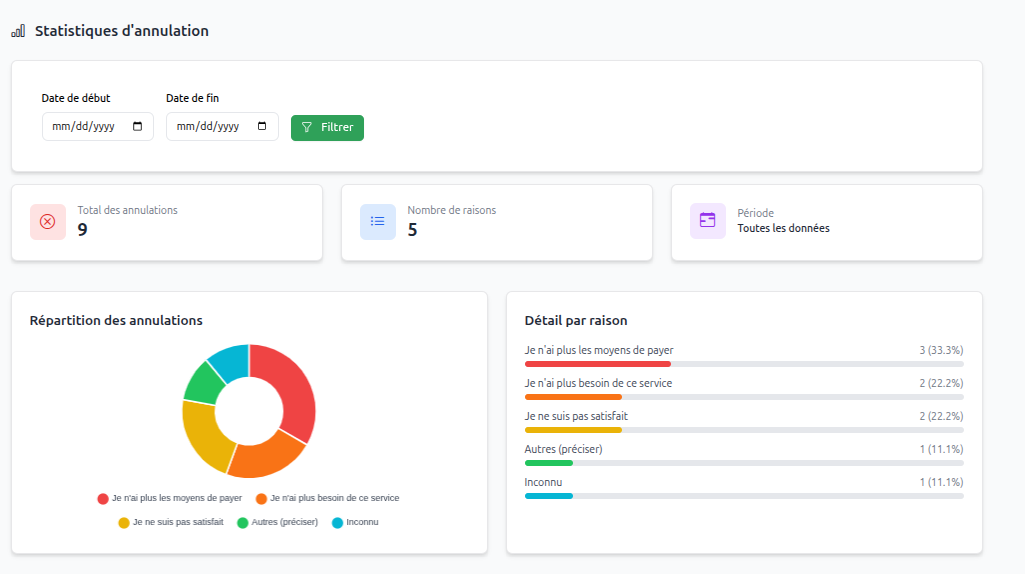
You can view service cancellation statistics based on cancellation reasons as a chart on the same page. This allows you to analyze the most common cancellation reasons and adjust your offers or services accordingly. You can filter statistics by period (day, week, month, year) for more precise insights.