Proxmox Templates & OSes
KVM Templates
CLIENTXCMS provides you with a set of preconfigured virtual server templates for Proxmox KVM. These templates are available for the following distributions:
- Debian 10
- Debian 11
- Debian 12
- Ubuntu 20.04
- Ubuntu 22.04
Installation
To begin, please download the zip containing the templates from the following link: KVM Templates
wget --user-agent="download" https://clientxcms.com/ref/template-kvm-proxmox -O Template-KVM.tar.gz
- Extract the downloaded file:
tar -xvf Template-KVM.tar.gz
You must first have installed the tar package.
sudo apt install tar untar
- Move the template configuration files to the Proxmox configuration folder:
mv Template-KVM/Config/* /etc/pve/qemu-server/
- Add the template disks to your Proxmox: To do this, you need to know the location of the local folder with the command:
cat /etc/pve/storage.cfg
Generally, the folder is located here: /var/lib/vz
- Move the disks to the correct folder.
mv Template-KVM/Disk/* /var/lib/vz/images/
The template installation is almost complete now. To finish, you just need to configure the storage space to accept the templates.
To do this, go to Datacenter > Storage > local and add Disk Image in content:
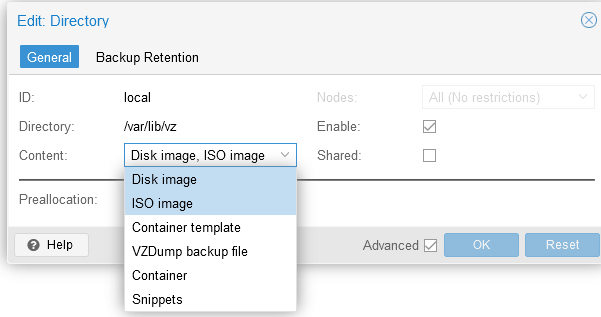
There you go, you have just installed the templates on your Proxmox. Thank you for your trust and we remain available for any questions.
LXC OSes
We are currently working on setting up LXC templates for Proxmox. These templates will be available soon.
Windows
We are currently working on setting up Windows templates for Proxmox. These templates will be available soon.